I always wanted to connect my CPC to a VGA display, but haven’t found a good solution to do this. During the last weeks I searched through eBay (search for “CGA VGA converter”) and found a seller in Hong Kong (eBay name “chowhe_taiwan”), who sells a CGA to VGA converter for a very cheap price (I paid at that time around 27 EUR including shipment).
UPDATE: The seller does not exist anymore, but there are a lot of alternatives on other platforms. You can e.g. search on eBay for (“cga vga”) or order it from AliExpress (prices start at 13 EUR).
It also was advertised for arcade machines, so I thought that this device should work with a CPC, too.
![]()
To sum it up, this are the features of the device:
- Supports CGA / EGA and YUV signal input
- Support the following VGA output resolutions: 640×480, 800×600, 1024×768, 1360×768
- CGA / EGA signal auto scan (15k, 24k, 31k)
- YUV signal auto scan (480i, 576i, 720i, 1080i, 480p, 576p, 720p, 1080p)
- Chinese and english on screen display (default is chinese, but you will find the menu to change the language easily)
- Position & zoom control
After two weeks the kit arrived and I had the time to have a look at it and it works really fine. It only has some problems with demos which intensively use hardware effects. Btw, the demo “Batman Forever” works fine with this converter (except the multi-colour picture :-(). I also tested some other demos which heavily used hardware effects and it seems that the converter works very good with them. Most of them work without any flaws.
To connect the device you have several options: you will find a connector on the left bottom side to directly connect the RGBS signal from the CPC to the converter, but I used the cable which was delivered with the device which is connected to the connector over the CGA 15pin SUB-D connector. The connection is really simple, but it depends on your CPC model of course.
This is the pinout of the connector cable:
| Cable color | Function |
| Red | Red analogue signal |
| Green | Green analogue signal |
| Blue | Blue analogue signal |
| Grey | Sync / RGB switching control |
| Yellow | VSync (don’t connect this) |
| Black | GND / Common |
Connection to the Amstrad CPC (464, 664, 6128):
To connect the converter to the Amstrad CPC, you just have to connect each signal cable directly to the corresponding pin of the monitor connector of the CPC. Have a look at the pinout of the connector. I also added an image from my soldered connector, which might help you building your own connector.
| Pin No. | Signal Name | Description |
| 1 | R | Red analogue signal |
| 2 | G | Green analogue signal |
| 3 | B | Blue analogue signal |
| 4 | Sync | RGB switching control |
| 5 | GND | Common |
| 6 | Lum | Luminance |
Connection to the Amstrad Plus (464+, 6128+, GX4000):
The connection to the Plus is nearly the same, but you have a new pinout, because the Plus monitor connector contains two additional pins for audio output.
| Pin No. | Signal Name | Description |
| 1 | Sync | RGB switching control |
| 2 | G | Green analogue signal |
| 3 | Lum | Luminance |
| 4 | R | Red analogue signal |
| 5 | B | Blue analogue signal |
| 6 | L | Left audio signal |
| 7 | R | Right audio signal |
| 8 | GND | Common |
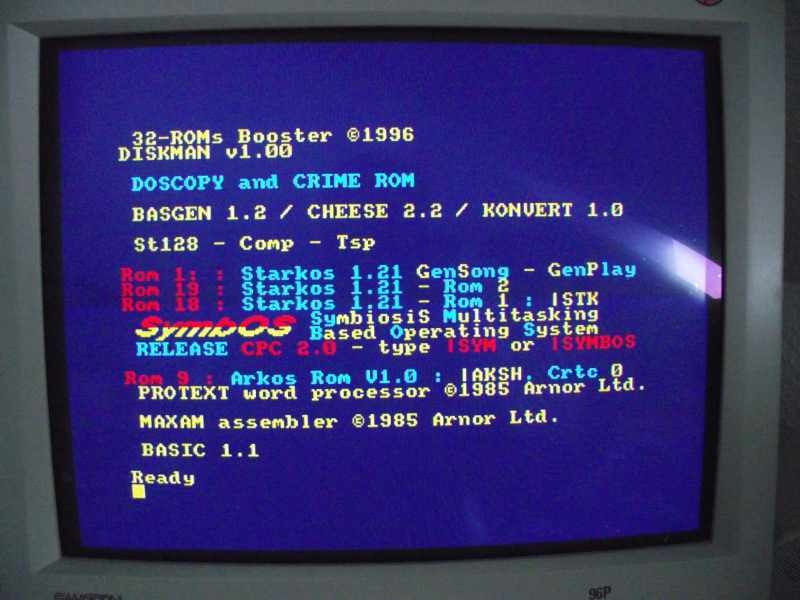
If you connected the wires correctly and switch on your CPC, you should see something similar to this image (I used a CRT in this test):
And here are some screenshots which I took with my digicam of several demos:
After all I really like this device and it seems to work in most cases and I would definitively buy it again :-)!